A Network I Can Break
I’ve spent a considerable amount of time studying networking, but understanding concepts on paper is different from actually configuring them. I wanted an environment where I could experiment with routing, firewalls, and network services without worrying about disrupting anything outside my lab.
That’s what led me to build a small virtual homelab using VMware Workstation Pro.
Five Machines
The environment consists of five virtual machines: an OPNsense firewall, two Debian systems, a Windows 11 workstation, and Kali Linux.
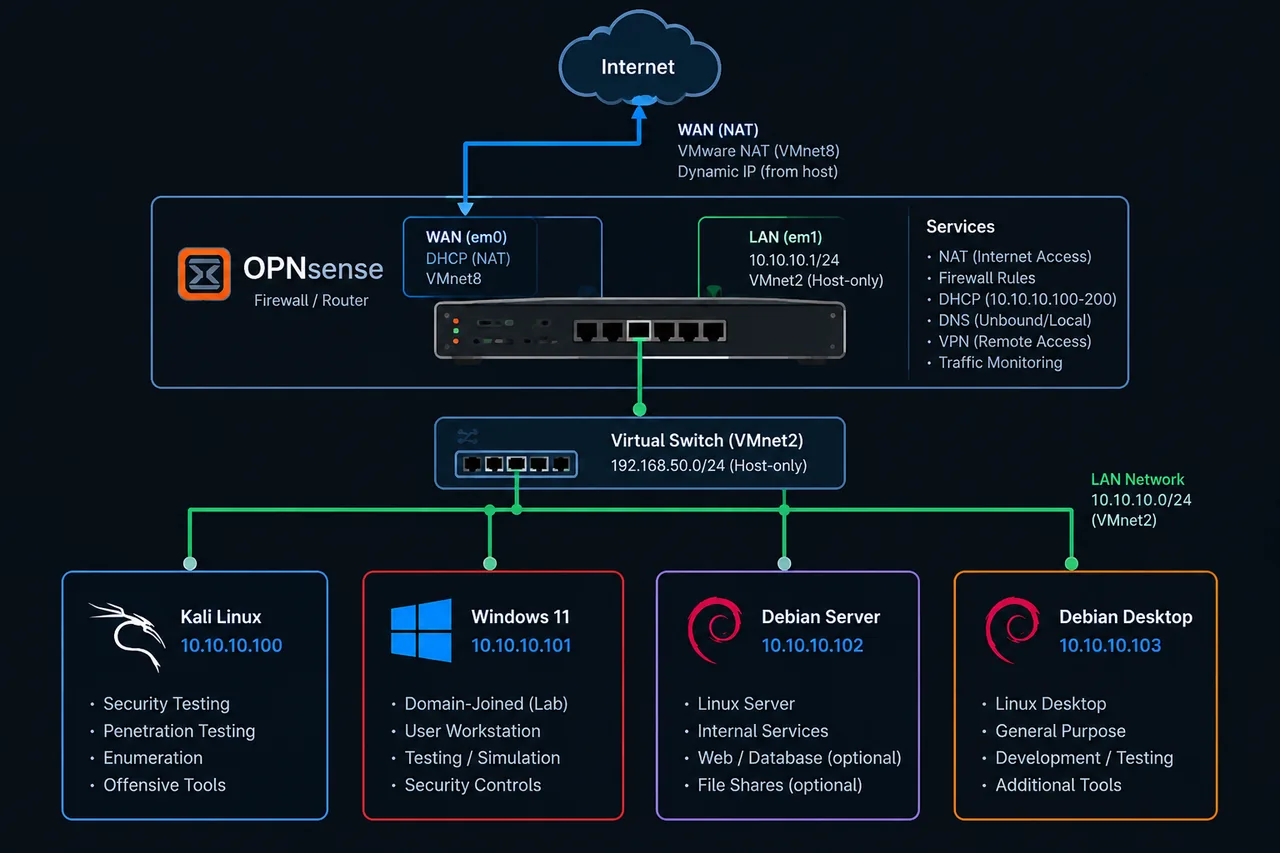
Each machine serves a different purpose. One Debian system operates as a lightweight server, while the other provides a Linux desktop environment. Windows serves as a workstation, and Kali is reserved for security testing.
OPNsense handles the network infrastructure. Its WAN (Wide Area Network) interface connects through VMware NAT (Network Address Translation), while its LAN (Local Area Network) interface connects to VMnet2. The internal network uses 10.10.10.0/24, with 10.10.10.1 as the gateway. DHCP (Dynamic Host Configuration Protocol) handles address assignment.
Making Everything Talk
Installing the operating systems was straightforward. Configuring the network between them required more attention.
I worked through interface configurations, routing tables, firewall rules, and connectivity tests to ensure every machine could communicate as intended. The goal was to maintain an isolated internal environment while still providing internet access when needed.
When Something Doesn’t Work
Troubleshooting was easily the most educational part of this project. A missing IPv4 address or incorrect route could prevent an otherwise properly configured machine from communicating.
Working through those issues gave me a better understanding of how networking components depend on one another. Concepts like default gateways and routing tables became much easier to understand when I could observe the consequences of incorrect configurations.
An Environment That Doesn’t Need to Be Finished
The advantage of a homelab is its flexibility. I can expand it with additional subnets, experiment with VLANs (Virtual Local Area Networks), deploy services, analyze traffic, or practice defensive and offensive security techniques.
It provides an environment I can continuously adapt as my interests and technical knowledge develop.
Final Thoughts
Building this homelab helped bridge the gap between theoretical networking knowledge and practical experience.
Five virtual machines aren’t particularly complicated on their own, but configuring them into a functional network taught me considerably more than simply installing five operating systems.
More importantly, I now have an environment where I can experiment, troubleshoot, and continue learning on my own terms.